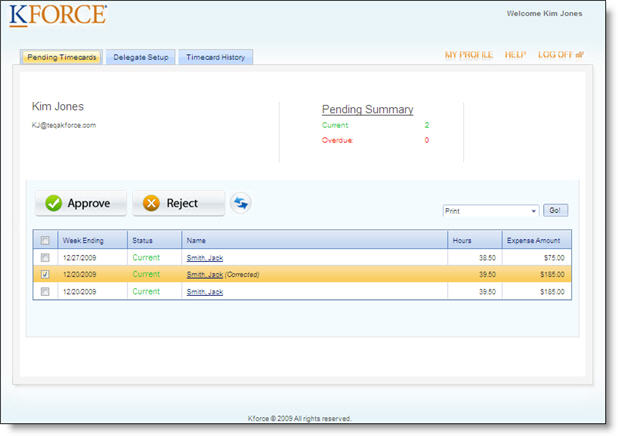
The Pending Timecards page is where you can approve and reject timecards, as well as view timecard details.
Refer to the table below for more information on the features and functionality found on this page.
| Field | Description |
| Delegate Setup Tab | Click this tab to set up another person to approve your timecards when you are unable to do so. |
| Timecard History Tab | Click this tab to view all the timecards you have approved or rejected for the past 10 weeks. |
| My Profile Link | Click this link to access a page to update your password and user name. |
| Help Link | Click this link to open the help system. |
| Log Off Link | Click this link to exit the system. |
| Pending Summary | This
summary shows you at a glance if you have any outstanding timecards
to process and if their status is current or overdue.
|
| Approve/Reject Buttons | Click one of these buttons to either approve or reject the timecard entries. |
| Refresh Button | Click this button to refresh the grid details. |
| Print/Export Option | Print: Provides a hard copy of the grid details.
Export to Excel: Creates an Excel workbook for further manipulation and sorting of pending timecards. Export to PDF: Creates a soft copy of the report that you can print or e-mail. |
| Grid Details | This grid displays a list of timecards and expenses submitted by your reporting consultants. |
 Current
and Overdue counts include "future" timecards.
Current
and Overdue counts include "future" timecards.